

STSDATA NexaOrch 1.5
The routines your business runs on — with a schedule, an owner and a history.
Schedule, run and monitor data loads, scripts and backups — across several databases, inside your own infrastructure, with no charge per execution.
The problem
Nobody knows whether it ran until the customer complains.
If any of these is your Monday morning, the problem is not a shortage of people — it is the absence of a platform. This is not an edge case: it is what normally happens to a company that solved each routine wherever it first appeared.
The script on somebody's machine
The critical routine runs from a .bat scheduled on an analyst's desktop. Then they go on holiday.
A cron job that never tells you
It failed at 2 a.m. You find out at 9, from the customer — because cron has nobody to tell.
A scheduler locked to one database
SQL Server Agent is excellent. It is just that half of your data is not in SQL Server.
Only one person understands it
The process lives in the head of whoever wrote it. No versions, no history, no audit trail.
What it is
An enterprise platform for routine automation — not one more cloud service.
You connect your databases, build the process as a sequence of steps (SQL, Shell, Python, data copy, backup) and schedule it. From there, distributed executors run the work, the history records everything, and the right people are told when something fails.
It runs on your premises — your own server, in a container, with no dependency on the internet. And the price is per installation, not per how much you use it.
What changes in practice
Six changes, each one backed by the feature that delivers it.
Visibility
You know what ran, when, for how long and with what result.
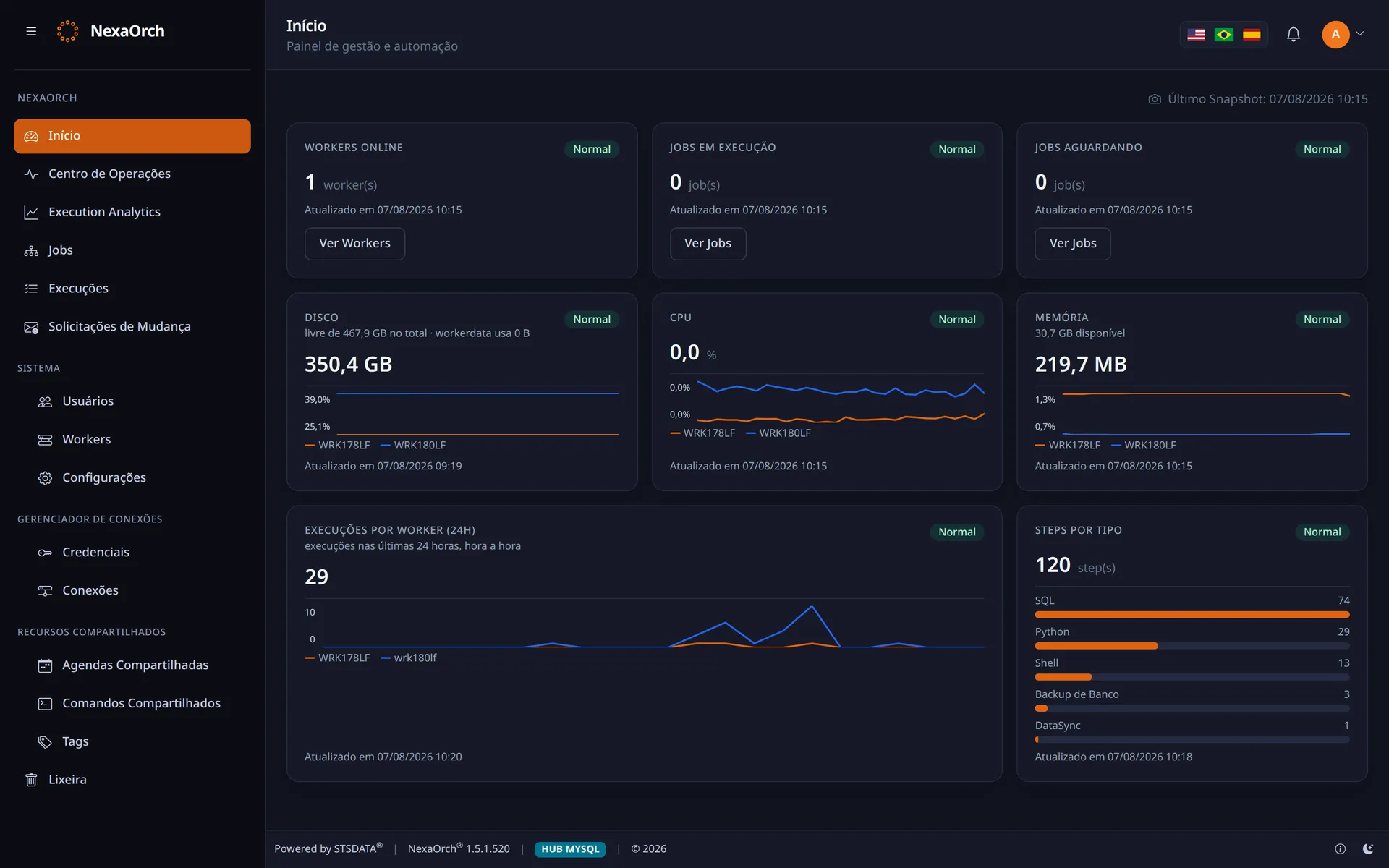
Prova: per-step history, full logs and three live dashboards.
Continuity
If an executor dies in the middle of the night, the execution does not hang forever.
Prova: several executors on the same database, and automatic recovery after a crash.
Control
Whoever runs it does not edit it. Whoever edits goes through versioning and approval.
Prova: 5 user roles, mandatory check-out and human approval of changes.
Database independence
The same process talks to databases from different vendors.
Prova: 7 execution providers, including Oracle, DB2, Firebird and ODBC.
Predictability
Schedules with an explicit time zone, and an email when something goes off the rails.
Prova: time zone per schedule, dependencies between steps and two-level notification.
Cost that does not surprise you
Doubling the workload does not double the bill.
Prova: a flat yearly price per installation. Nothing per execution, environment-hour or user.
How it works
Three steps, and the routine stops being a loose script.
Connect
Register your databases and credentials once. The password is encrypted and never appears in the script.
Build the process
Steps in sequence: SQL, script, data copy, backup. Each step decides what to do if it fails.
Schedule and watch
Pick the schedule and the time zone. The rest shows up on the dashboard — including what went wrong.
Who it is for
Who feels this first.
Teams with overnight loads
Teams living between databases
Teams that must prove it
Whoever gets paged at 3 a.m.
Proof and trust
Your data never leaves your premises.
It is the argument that weighs most in mid-sized and large companies — and the one no cloud scheduler can offer.
Genuinely on-premise
Installed on your server, in a container. With the hub on your server too, it works with no internet at all.
Secrets stay secret
Credentials are encrypted, injected into the script as environment variables and masked in the logs.
Complete audit trail
Every execution records who triggered it, what ran and which version was published at the time.
Comparison
“But doesn’t the scheduler that comes with it already solve this?”
It does — for its own services. Your operation, though, does not live in a single place. The full picture, with what each ecosystem does well and where it locks you in, is on the comparison page.
| Ecosystem | The bundled scheduler | Where it locks you in |
|---|---|---|
| Microsoft | SQL Server Agent | Tied to SQL Server; Fabric/ADF charge by consumption and assume your data is in the cloud. |
| Oracle | DBMS_SCHEDULER | Tied to the Oracle database; no multi-database view and no operations screen. |
| AWS | EventBridge Scheduler | Real orchestration means composing Glue + Step Functions + MWAA + IAM. |
| Cloud Composer | Airflow billed by environment-hour: you pay 24/7 to run 20 minutes a day. |
Who is behind it
Twenty years of data operations before the first line of this product.
NexaOrch is not our team’s first encounter with a load that runs into the small hours, a database that will not talk to its neighbour, or an integration between platforms that were never meant to speak. It grew out of more than 20 years of enterprise BI, databases, automation and multi-platform integration in mid-sized and large companies, domestic and multinational.
Nothing here is a laboratory hypothesis: every rule in the product exists because a real operation sent the bill first.
Enterprise BI
Two decades building and keeping alive the analytics operation of companies that depend on it to close the month — not the pretty dashboard, the load that has to be ready by 7 a.m.
Databases
Oracle, SQL Server, PostgreSQL, MySQL/MariaDB, Firebird, DB2. A real customer environment is heterogeneous, which is why the product was born multi-database.
Automation and integration
Legacy ERP, a file on SFTP, a third-party API, a spreadsheet that became a process. The multi-platform chain NexaOrch orchestrates is the one we were already holding together by hand.
Shall we look at this on your own operation?
A 30-minute conversation is usually enough to tell whether it makes sense.